Back to Blog
How to Analyze Your Meta Ads Report and Know Exactly What's Working (Without Being an Expert)
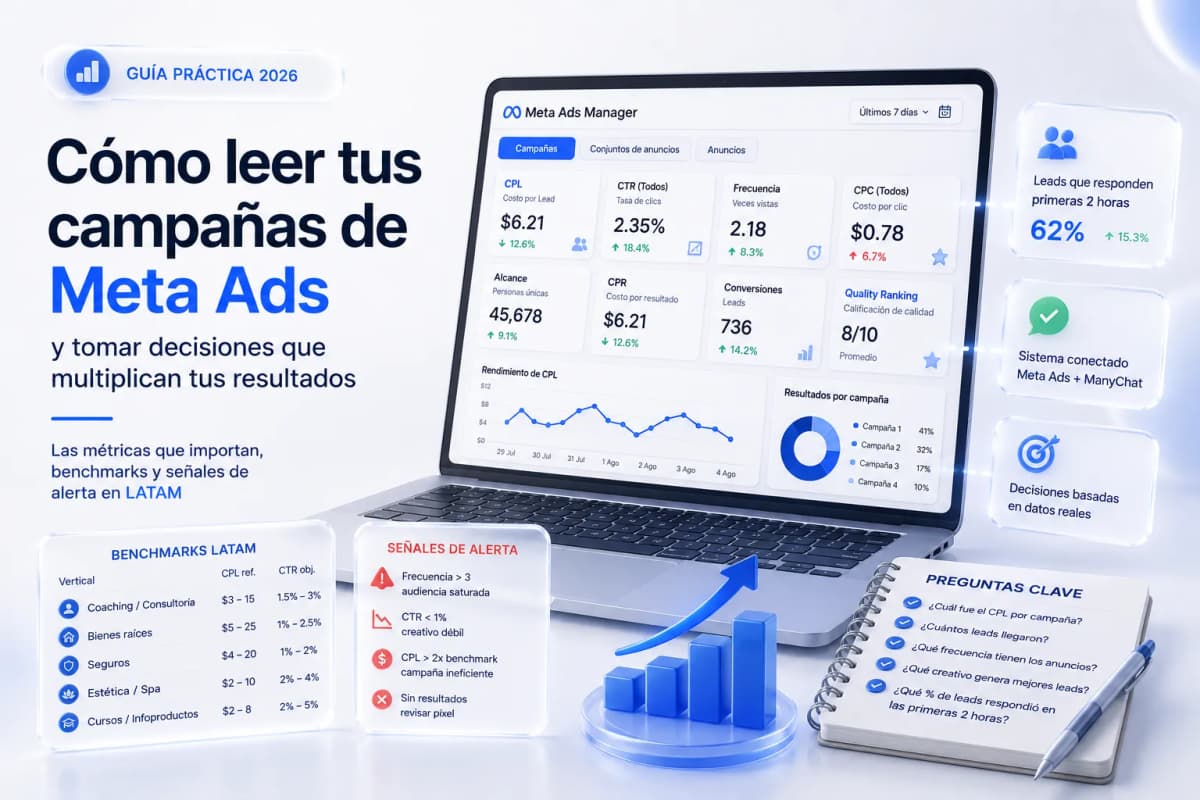
Most service professionals running Meta Ads don't understand their own reports. They rely on whatever their agency tells them, or keep paying without understanding the numbers. The problem isn't the complexity of the dashboard — it's knowing which of the 40+ available metrics actually matter and what each number means for your type of business.
The 8 Metrics That Matter (and the Ones That Don't)
Meta Ads Manager shows dozens of columns. Most are noise. These eight determine whether a campaign is working or burning budget:
|
Metric |
What it measures |
Why it matters |
|---|---|---|
|
CPL (Cost per Lead) |
Cost of each generated lead |
The primary metric for lead generation campaigns |
|
CPC (Cost per Click) |
Cost of each click to the ad |
Indicates whether the creative is stopping the scroll |
|
CTR (Click-Through Rate) |
% of people who click |
Measures ad relevance to the audience |
|
Frequency |
Times a user sees the ad |
Above 3 signals audience saturation |
|
CPR (Cost per Result) |
Cost per defined objective action |
The ROAS equivalent for service businesses without e-commerce |
|
Quality Ranking |
Quality score vs. similar ads |
Indicates whether the landing or destination flow is relevant |
|
Reach |
Unique people who saw the ad |
Useful only in combination with CPL and frequency |
|
Conversions |
Completed actions (lead, message, click) |
Verifies the pixel or integration is tracking correctly |
Vanity metrics that don't drive decisions: likes, reactions, positive comments, shares. An ad can get 500 likes and zero leads — engagement doesn't pay the bills.
A note on ROAS for services: Return on ad spend only works if you have revenue-tracked conversions. For coaches, consultants, and agents who close via WhatsApp or phone, ROAS isn't directly calculable. The relevant metric is CPL or CPR: how much it costs to bring the prospect to first contact.
How to Read the Meta Ads Manager Dashboard Step by Step
The panel has three levels: Campaigns → Ad Sets → Ads. Each level shows aggregated data for what it contains. Reading the report correctly means checking all three.
Campaign level: this is where CPL and total spend live. If campaign CPL is above benchmark, the problem could be in the ad set (wrong audience) or in the ad itself (creative that doesn't convert).
Ad set level: this is where the audience is defined. If two ad sets with the same creative have significantly different CPLs, the difference is in the targeting. The ad set with the better CPL deserves more budget.
Ad level: this is where CTR, frequency, and CPC live. A low CTR (<1%) means the ad isn't stopping the scroll — a creative, image, video, or first-3-seconds problem. High frequency (>3) with dropping CTR means the audience has already seen that creative too many times.
How to add the right columns:
In Ads Manager → right column → "Columns" → "Customize Columns." Add: CPL (or "Cost per result"), CTR (all), frequency, reach, CPC (all). Save this view as your default so you don't have to reconfigure it every session.
Failing Campaign vs. Working Campaign: Signals and Benchmarks
These are the alert thresholds that indicate you need to act:
Signs a campaign is failing:
- CPL more than 2x the benchmark for your vertical
- Frequency above 3 with CTR dropping
- CTR below 1% after 3 days past the learning phase
- Budget spent with no results recorded (check if the pixel is active)
- Cost per result rising day over day in a campaign that previously performed well
Signs a campaign is working:
- CPL stable or declining over 3–5 consecutive days
- CTR between 1.5% and 4%, sustained
- Frequency between 1.5 and 2.5
- Leads arriving in the ManyChat flow and responding within the first 2 hours
Reference benchmarks by vertical (US/CA/UK, Click-to-WhatsApp or Lead Gen campaigns):
|
Vertical |
CPL range |
Target CTR |
Typical CPC |
Ideal frequency |
|---|---|---|---|---|
|
Coaching / consulting |
$15–50 |
1.5–3% |
$1.5–5 |
1.5–2.5 |
|
Real estate |
$20–75 |
1–2.5% |
$2–8 |
1.5–2.5 |
|
Insurance |
$15–60 |
1–2% |
$1.5–6 |
1.5–2.5 |
|
Wellness / spa |
$8–30 |
2–4% |
$1–4 |
1.5–2.5 |
|
Courses / info products |
$8–25 |
2–5% |
$1–3 |
1.5–2.5 |
When to scale the budget: when CPL stays below benchmark for 3–5 consecutive days and lead volume is consistent, increase budget by 20–25%. Don't double it — large sudden changes reset the algorithm's learning phase and typically spike CPL temporarily.
The gap that Meta reports don't measure: CPL measures the cost of bringing a prospect to first contact. What happens after that — whether they respond, qualify, or book — doesn't appear in Meta. That's where ManyChat comes in: the response rate within the first 2 hours is the indicator that connects ad cost to actual conversion. A low CPL with a poor response rate is wasted budget.
The Question to Ask Your Agency Every Week
The question every service professional should ask their agency every Monday:
"What was the CPL per campaign last week, how many leads came in, and what percentage responded within the first 2 hours?"
If the agency can't answer that in under 2 minutes with specific numbers, they're not actively monitoring the campaigns. The minimum weekly report you should receive includes those three data points: CPL, lead volume, and response rate.
Audit question checklist to review with your agency (or on your own):
- What is the current CPL per campaign, and how does it compare to last week?
- How many leads came in last week, and from which campaign?
- What is the frequency on active ads?
- Are there ads with CTR above 2%? Which ones?
- How many ad sets are still in the learning phase?
- Which creative is generating the cheapest leads?
- What percentage of leads responded within the first 2 hours?
- Is the conversion event being tracked correctly in the pixel?
Questions 1–6 evaluate ad performance. Question 7 evaluates the performance of the post-click follow-up system. Question 8 is technical but critical: if the pixel isn't recording conversions, the Meta algorithm has no optimization signal and campaign learning degrades over time.
Ready to Get More Clients?
At Asio, we teach you to implement these strategies step by step through the Mastery program — combining Meta Ads, ManyChat, and conversational automation so you get more appointments and close more sales, without relying on manual messages.