Back to Blog
The System Coaches Use to Get 50 Clients in 90 Days with ManyChat and Meta Ads
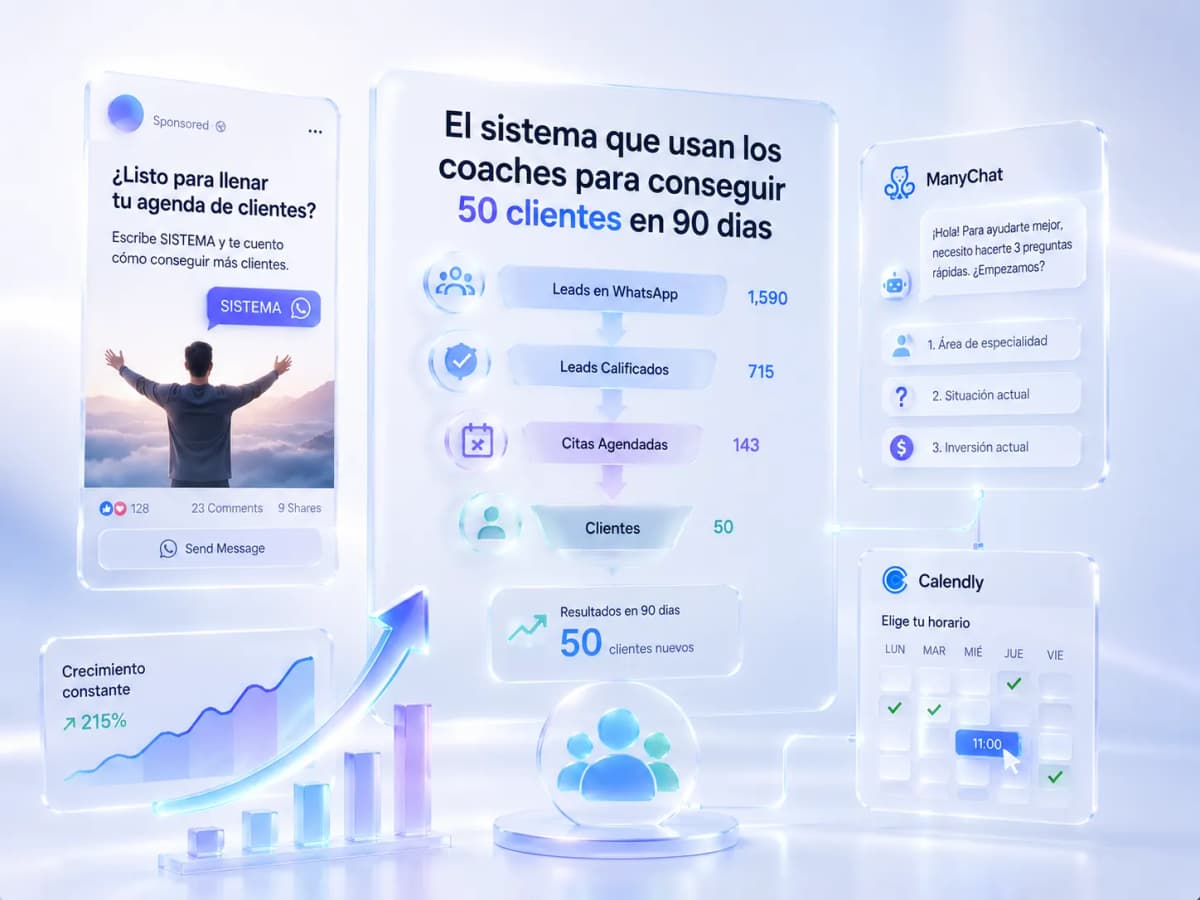
Most coaches get clients through referrals — which means their revenue depends on what other people do for them, not on a system they control. This article describes the reproducible framework that changes that: Meta Ads + ManyChat + Calendly, with the technical logic for every step.
The Starting Point: The Coach Who Depends on Referrals
The coach without an automated system has a recognizable pattern: some months four new clients show up, other months none. They don't know where the ones who came found them, they can't predict how many will arrive next month, and there's no way to scale without working more hours.
The problem isn't the product — most coaches have a clear offer and real results with clients. The problem is that there's no acquisition engine running when they're not actively posting, responding to messages, or asking clients for referrals.
The system that solves this has three components: paid traffic that generates a consistent daily flow of leads (Meta Ads), conversational automation that qualifies those leads without manual intervention (ManyChat), and a scheduling tool that converts qualified leads into booked calls (Calendly). What follows is how each piece works and how they connect.
The Stack: Meta Ads + ManyChat + Calendly
|
Tool |
Role in the system |
What happens without it |
|---|---|---|
|
Meta Ads |
Generates a predictable daily flow of new leads |
Without paid traffic, volume depends on inconsistent organic posting |
|
ManyChat |
Qualifies automatically, filters curious visitors from real prospects, sends Calendly only to those who qualify |
Without automation, the coach responds manually and loses leads through slow response times |
|
Calendly |
Eliminates the friction of scheduling coordination and registers the appointment automatically |
Without automated booking, every appointment requires a multi-message back-and-forth |
The key integration: the Meta ad opens a conversation in DM directly (Click-to-DM on Instagram, or Click-to-WhatsApp for LATAM audiences), ManyChat takes control of that conversation with the automated flow, and only when the lead passes the qualifying questions does the bot send the Calendly link.
The Complete Flow, Step by Step
Step 1 — The Ad: Trigger That Opens the Conversation
The ad doesn't try to sell the coaching program — that closes before it opens. The ad does one of three things:
- Names the specific problem the prospect recognizes: "Getting clients only when you post or when someone refers you? Comment SYSTEM and I'll show you how to change that."
- Offers a free diagnostic: "Free 30-minute review for coaches who want a full calendar without depending on referrals. Comment DIAGNOSTIC to reserve your spot."
- Shows a concrete hypothetical result: "What would it look like if you could generate 8 leads a day without posting manually? Comment LEADS and I'll walk you through the system."
The CTA is always a keyword that triggers the ManyChat bot in DM.
Step 2 — The Qualification Bot: 3 Questions in Order
When the lead types the keyword, ManyChat responds immediately. The bot's goal isn't to sell — it's to qualify so the coach only talks to prospects who can actually become clients.
Message 1 — welcome:
"Hey [Name]! 👋 Thanks for reaching out. I'm [coach's name] and I work with coaches and consultants to help them get consistent clients without depending on referrals. To see if I can help, I have 3 quick questions. Ready?"
Message 2 — specialty area:
"What area do you coach in?A) Business, sales, or marketing
B) Personal development, relationships, or mindset
C) Health and wellness
D) Something else — tell me in one line"
Message 3 — current situation:
"Roughly how many paying clients do you have right now per month?"
Message 4 — program price:
"What does your main coaching program or package cost? (A range is fine — no need to be exact)"
Step 3 — The Fork: Calendly Only for Those Who Qualify
The qualifying criteria is set by the coach based on their offer. A typical example: the lead qualifies if they have at least 1 active paying client and their program costs $300 USD or more.
If they qualify → Message 5a:
"Perfect, [Name]. Based on what you've shared, I think I can help you get more clients without depending on posting every day or waiting for referrals. Do you have 30 minutes this week for a free diagnostic call where we look at your current situation and map out what specific steps would get you more clients in the next 60–90 days?📅 Pick the time that works best for you here: [Calendly link]"
→ Tag: QUALIFIED_BOOKING
If they don't qualify → Message 5b:
"Thanks for sharing that, [Name]. What you've described tells me a lot about where you are right now. At this stage, the highest-leverage move is building out your offer and getting your first few paying clients before investing in paid traffic. I'll send you a resource that helps coaches in that exact position — can I share it here?"
→ Tag: COLD_PROSPECT → enters NURTURING_21D educational sequence
Step 4 — Automatic Reminder 24 Hours Before the Call
"Hey [Name] 👋 Just a reminder that tomorrow [day] at [time] we have our diagnostic call.Are you still good to go? If you need to reschedule, you can do it here: [Calendly link]Any questions before the call, just send them my way 🙌"
Step 5 — Reactivation If the Qualified Lead Didn't Book
If the lead received the Calendly link but didn't schedule within 48 hours:
"Hey [Name], I noticed you didn't end up picking a time for the diagnostic call. Was there something unclear, or something that made you hesitate?No pressure if the timing isn't right — I just want to understand if there's another way I can help."
If they respond and explain → the coach picks up manually.
If no response in 48 hours → tag NURTURING_21D + 21-day educational content sequence.
Step 6 — Flow for NO_SHOW
If the lead booked but didn't show up for the call:
Message 30 minutes after the scheduled time:
"Hey [Name], I was waiting for our call at [time]. Did something come up? Happy to reschedule for this week if that works for you 🙏"
No response in 48 hours → NURTURING_21D.
What Separates a Bot That Converts From One That Doesn't
The most common mistake: the bot tries to sell the program in the first message. The result is that the lead feels they're being closed before they understand what they're getting, and they exit the conversation.
A bot that converts does the opposite: qualify first, propose second. The bot's questions serve two functions simultaneously — they filter out unqualified prospects AND they give the qualified prospect the sense that the coach already understands their specific situation before the call. When the Calendly link arrives, it doesn't feel like a sales pitch. It feels like a natural next step.
The call also needs to be framed correctly: a "diagnostic call" or "review call", not a "sales call." The prospect most resistant to a sales pitch will agree to a diagnostic call because they perceive they're going to get clarity, not to be sold something.
Realistic Benchmarks for This System
|
Metric |
Typical range for coaching businesses |
|---|---|
|
CPL (cost per DM lead) |
$12 – $40 USD (US/CA/UK market) |
|
Qualification rate (leads who complete the bot) |
35 – 55% |
|
Booking rate (qualified leads who schedule a call) |
15 – 25% |
|
Call show rate |
55 – 70% |
|
First-call close rate |
25 – 40% |
Close rate improves significantly with prior qualification. A coach who enters a call without knowing anything about the prospect closes at a lower rate than one who already knows the prospect's specialty area, how many clients they have, and what they charge — because they can present the proposal in terms of that person's specific problem.
The Math: How to Get to 50 Clients in 90 Days
Working backward from the benchmarks:
|
Variable |
Calculation |
|---|---|
|
Goal |
50 new clients in 90 days |
|
Close rate at 35% |
143 calls needed |
|
Booking rate at 20% of qualified |
715 qualified leads |
|
Qualification rate at 45% of total |
~1,590 total leads |
|
CPL at $25 USD |
~$39,750 over 90 days (~$440/day) |
|
CPL at $15 USD |
~$23,850 over 90 days (~$265/day) |
That daily budget generates approximately 10–18 leads, of which 5–8 qualify, and 1–2 book. With a 65% show rate and 35% close rate, the system produces roughly 0.5–1 new client per day — which compounds to 45–90 clients over 90 days.
For coaches with a high-ticket offer ($1,500–$5,000+ programs), the math changes significantly: CPL can be higher ($40–$80 USD), fewer leads are needed per client, and the qualifying criteria in the bot is more selective. The economics work well at much lower lead volume.
Coaches who reach 50 clients in 90 days don't have a better product than average. They have a system that runs whether or not they posted that day, that weekend, or that week.
Ready to Get More Clients?
At Asio, we teach you to implement these strategies step by step through the Mastery program — combining Meta Ads, ManyChat, and conversational automation so you get more appointments and close more sales, without relying on manual messages.