Back to Blog
Conversational Marketing for Dentists: Fill Your Schedule with Patients Using WhatsApp and Meta Ads
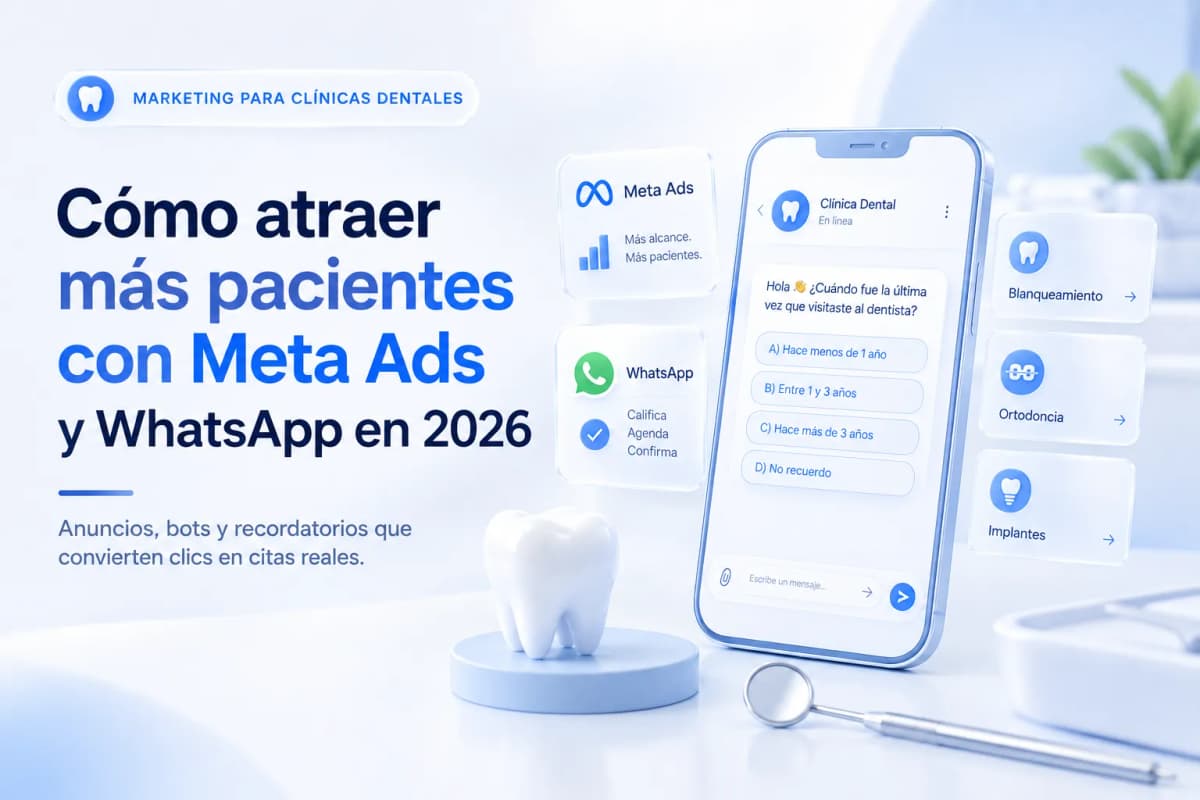
Dental practices have two distinct marketing problems: attracting new patients and preventing confirmed appointments from not showing up — and both are solved with the same system: Meta Ads that lead to a WhatsApp bot that qualifies, books, and sends appointment reminders.
Why the Dental Consultation Starts on WhatsApp, Not the Phone
The patient who needs a dentist doesn't call first. They search on Google or see an ad, and if they're interested, they prefer to message before committing to a call — especially when dental anxiety or price sensitivity is part of the equation.
WhatsApp removes that friction: the patient can ask "how much does whitening cost?" without feeling like they've already booked an appointment. That question is the first qualified conversation. If the bot responds well and offers a time slot, 40–60% of those conversations in well-configured dental practices end in a booked appointment.
The phone, by contrast, has a structural problem for dental offices: the majority of calls to dental offices during business hours aren't answered on the first try — the receptionist is occupied with another patient. A prospect who doesn't reach someone the first time rarely calls back.
Meta Ads for Dentists: What to Promote and How
Services That Convert Best in Ads
Not all dental services perform equally in Meta Ads. Treatments with visible results and accessible price points generate the most initial conversations:
|
Service |
Why it works in ads |
Price range (US) |
|---|---|---|
|
Teeth whitening |
Visible aesthetic result, moderate price |
$300–$800 USD |
|
Cleaning + checkup |
Low barrier to entry, no procedure fear |
$100–$250 USD |
|
Orthodontics / Invisalign |
High intent, longer decision cycle |
Quote in consultation |
|
Dental implants |
High value, requires pre-qualification |
Quote in consultation |
|
Dental emergencies |
High intent, real urgency |
Immediate response |
Whitening and cleaning work as entry-point services — the patient who comes in for whitening becomes a recurring patient if the experience is good.
Hooks That Convert vs. Ones That Don't
❌ "Dental Office [Name] — 20 Years of Experience Serving Your Community"
✅ "When was the last time you visited the dentist? Free first visit this week — limited spots"
❌ "Professional teeth whitening — guaranteed results"
✅ "Up to 8 shades whiter in one session. Pain-free. Free consultation — spots filling fast"
❌ "Contact us for more information"
✅ "Text 'APPOINTMENT' and we'll send you available times today"
The dental ad that converts addresses the patient's fear or desire in the first line — not the practice's name or history.
Starting Budget by Market
|
Market |
Monthly starting budget |
Expected CPL (whitening / cleaning) |
|---|---|---|
|
Major US city |
$400–$1,000 USD |
$20–$60 USD |
|
Mid-size US city |
$250–$600 USD |
$15–$40 USD |
|
Canada |
$300–$700 USD |
$18–$50 USD |
|
UK |
$300–$700 GBP |
£15–£45 |
Click-to-WhatsApp (or Click-to-DM in markets where WhatsApp usage is lower) outperforms ads that send traffic to a website or form, because the patient can ask questions before committing — which is especially important in a sector where fear and price are the two most common objections.
Instagram Reels for Dental Practices: 3 Formats That Generate Appointments
Reels aren't for selling directly — they're for building trust before the paid ad arrives, and for appearing organically when patients search for dental content.
Format 1: Before and After (Most Effective)
A 30-second video showing the result of a treatment — whitening, braces, implant. No elaborate production needed: a before photo, the procedure summarized in 10 seconds, the after photo.
CTA at the end: "Want to know if you're a candidate? Message us 'SMILE' in our bio."
Format 2: Dental Myth Debunked
❌ "Fluoride is bad for your teeth" → ✅ the truth in 45 seconds with the dentist looking directly at camera.
This format positions the dentist as an authority and generates saves — people save health content they find valuable. Saves increase the organic reach of the video.
Format 3: Direct Answer to the Most Common Question
"How long does whitening last?" / "Does getting braces hurt?" / "How much does a dental implant cost?"
The patient who has that question watches the whole video because they're looking for exactly that answer. End of video: "If you want to know if it applies to your situation, message us and we'll schedule a free evaluation."
The Complete Flow: Ad → Qualification Bot → Appointment
This is the flow that converts clicks into confirmed appointments without manual intervention:
Step 1 — The Ad
Click-to-WhatsApp ad with the specific service (whitening, cleaning, emergency). CTA: a single keyword ("APPOINTMENT," "WHITENING," "EMERGENCY").
Step 2 — Bot Welcome (ManyChat)
"Hi! Thanks for reaching out to [Practice Name]. I saw you were interested in [service]. To give you accurate information and offer you an available time, can you tell me:When was the last time you visited a dentist?
A) Less than 1 year ago
B) 1 to 3 years ago
C) More than 3 years ago
D) I don't remember"
Step 3 — Urgency Question
"Are you experiencing any pain or discomfort right now, or is this a routine / cosmetic inquiry?"
Step 4 — Booking
"Perfect. We have availability on [day] at [time] and [day] at [time]. Which works better for you?"
Patient confirms a time slot → tag QUALIFIED_BOOKING + notification to reception with name, service of interest, and confirmed availability.
Patient doesn't respond after the welcome → tag NURTURING_21D + follow-up sequence.
Patient doesn't respond to the sequence → tag COLD_PROSPECT.
WhatsApp to Reduce No-Shows: The Automatic Confirmation Sequence
No-show rates in dental practices typically run 15–30%. Every missed appointment is dead chair time that can't be recovered. A WhatsApp reminder sequence reduces that rate to 8–15% in practices that implement it consistently.
Reminder sequence:
|
When |
Message |
Expected action |
|---|---|---|
|
24 hours before |
"Hi [Name], a reminder that tomorrow [day] at [time] you have an appointment with [Dr. Name]. Can you confirm? Reply YES or NO." |
Confirm or reschedule |
|
2 hours before |
"Hi [Name], your appointment is in 2 hours. We'll see you at [address]. Any questions?" |
Reconfirmation or notice of delay |
|
Post-appointment (24h later) |
"Hi [Name], how did your appointment go yesterday? We'd love your feedback. You can also leave a review on Google [link]." |
Review + retention |
The post-appointment message serves two functions: bringing the patient back for the next visit and generating Google reviews, which are the primary decision factor for new patients in local searches.
Ready to Get More Clients?
At Asio, we teach you to implement these strategies step by step through the Mastery program — combining Meta Ads, ManyChat, and conversational automation so you get more appointments and close more sales, without relying on manual messages.